Does your UAE business need a mobile website, a web app or an iPhone app?
A mobile website is a good first choice when a customer follows a link, checks an offer and makes an enquiry. A web app earns its place when someone needs to return to their own bookings, orders or progress. Consider a native iPhone app when you can name a frequent task that regular customers would install it for. Start by walking through that task with the person who handles it at your business.
What does your customer need on the second visit?
Picture a prospective student opening a Dubai workshop link from a friend. They need the date, venue, price and a way to ask for a place. A public page can do all of that. Now picture the same student halfway through a course, trying to find the next lesson. The site has to recognise them, remember where they stopped and show the material they can access. That is a worthwhile reason to add a web app.
| What the person comes to do | A format to try first | What to check with staff |
|---|---|---|
| Open a shared link, compare sessions and ask for a place | A mobile website with a form or a messaging link | Does the organiser receive the chosen session and a way to reply? |
| Return from a phone or laptop to view a personal record | A web app with a customer account | Who changes the record, and when can the customer see that change? |
| Place a familiar pickup order or present a loyalty card on an iPhone several times a week | Trial an iPhone app with regulars, alongside the existing ordering route | Can the cashier find the order or recognise the reward while serving a queue? |
Use a recent enquiry to choose a row. Ask someone at the counter to show you what they did after it arrived. Redact the customer's details and keep the sequence. If staff copied a time and branch into a booking diary, that handover belongs in your brief whichever format you choose.
When is a public mobile website enough?
For a one-off event, let people open the exact programme someone shared, see the terms and contact the organiser. At Acting Gym in Dubai, BEIZ built a workshop website where visitors could compare plans and send their choice to the team in Telegram. The team received a booking enquiry and could follow up. That is a clear end point to test with the organiser. See the Acting Gym client project.
Suppose your own workshop has sessions in Dubai and Abu Dhabi. Try forwarding the Saturday session to a colleague who has never visited the site. Can they tell which venue it is, what the quoted AED price covers and whether a reply is needed to confirm a place? Have them send a test request. Read it on the receiving phone. If the city or session is missing, fix the form or message before commissioning a customer account.
When does a customer portal justify the extra work?
A web app keeps a record that people with different roles can use. In TalentHub, BEIZ's own learning platform, students return to their lessons and progress, while an administrator manages the learning material. A third person can check a certificate using its QR code. Each person needs a different view of the same course. Explore the TalentHub product.
For your own portal, draw the path of one record on paper. A student requests a change of session. The coordinator checks the place, approves the move and releases the old place. When the student next signs in, which date appears? Can they still open the previous session link? If staff already use a booking system, try its customer view with a test account. It may already cover the entire task. If a step is missing, that specific gap gives you a starting point for a customer web app brief.
When is it worth asking someone to install an iPhone app?
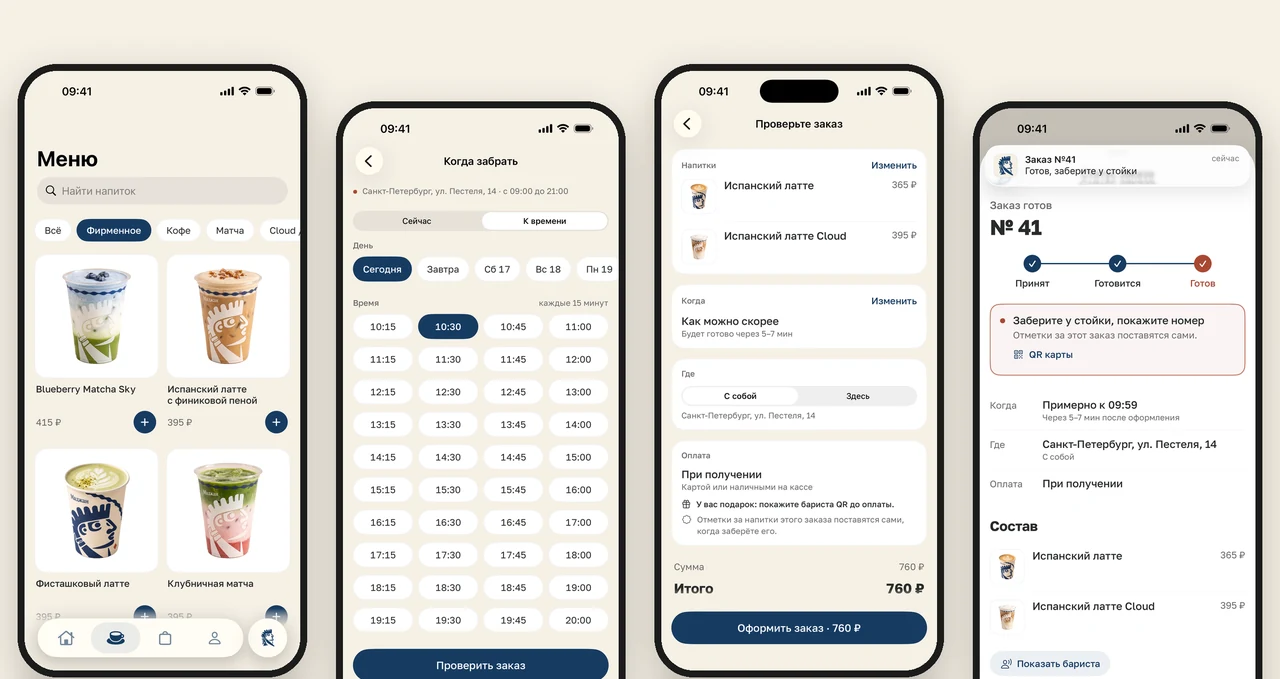
For Majan, a coffee shop in Saint Petersburg, guests could repeat a familiar routine on their phones. They picked a collection time, sent an order to the barista and received a notification when it was ready. The barista could scan a guest's QR loyalty card at the counter. BEIZ built the iPhone app and the connection to the shop's till. Guests paid at collection. The published case shows the order screens and the part staff played. See the Majan app.
For a UAE café, first try the proposed flow with regulars who normally order at the counter. Ask them to place a test order during a typical visit and show the pickup details to the barista. Try it again on another visit. Listen for the difference between a guest who enjoyed the demonstration and one who asks to use the same route again. Record their device with their permission. An iPhone-only release still calls for an ordering route that Android guests and first-time visitors can use.
If you plan to launch in several Gulf countries, include the target storefronts in the release brief. Apple lets the publisher select the countries or regions where the app is available. The customer's Apple Account country or region determines their storefront. Check availability with the publisher before putting a download link on the counter or in a campaign. Apple's guide to App Store availability.
How can you test the choice before asking for a quote?
Write down what would count as a completed task and ask two people to act it out, one as the customer and one as the staff member. Paper screens and a sample entry in the diary are enough for the first round. Give them a real branch name and fictional customer details. Keep a note of the step where someone has to stop and ask what happens next.
- Test the first visit. Send a link in the channel customers actually use. Ask the recipient to find the branch, choose an offer and complete the agreed action on their own phone. Check whether the right staff member can pick it up without asking for the branch again.
- Test a return visit. Close the browser or app. Have the customer come back later and find the booking or order. For an account, give the staff member a separate test login and have them update the record. Ask the customer to read back the new status.
- Test a change of plan. Mark a class full or a drink sold out while the guest is choosing. Agree what the guest should see and who can offer an alternative. A success message is useful only when the team can fulfil what it says.
- Test both languages you intend to offer. If customers will use English and Arabic, run the same task in each. Check the selected branch, time, reference and confirmation all the way to the staff desk. For a project outside the UAE, choose your country to see an example of the information the local team needs.
What should you put in the first release?
Write a sentence someone can demonstrate. “A returning student can move a booking to an available session, and reception sees both changes in the diary” gives a developer more to estimate than “we need an app”. List the one task, its owner, the devices involved and the check both sides will run before launch. Put later ideas in a separate list.
Price the public page, account features and till or booking connection as separate items. Ask who will handle updates after launch and how staff will help someone who loses access. If the brief points to an iPhone app, the BEIZ iOS service page includes a downloadable brief that covers ordering, staff handover and release. If a public site already does the job, use the website preparation checklist to get the offer, materials and enquiry route ready.
Know what you need?
Let’s make it happen.
Start with a conversation. We’ll come back with a plan, a timeline and an estimate.
Let’s talk